Docs · Guide
Get started
magpie is one place to choose the model each of your agents uses. Add the providers you have, then pick a model per agent; magpie writes it into that agent’s own config.
Behind it is a small gateway on your machine, at 127.0.0.1:3425. It speaks the OpenAI, Anthropic and Gemini APIs and translates between them, streaming and tool calls included, so any agent can use any provider’s models: Claude Code on a GPT model from your ChatGPT plan, Codex on DeepSeek, OpenCode on your Claude plan.
Providers
Where models come from: subscriptions you sign in to, vendors you have an API key for, and your own endpoints. Each model is named provider/model.
Agents
The tools that use them: Claude Code, Codex, Gemini CLI, OpenCode and the rest. One row each, with the model it is set to.
Gateway
The local endpoint every agent is pointed at when you pick a model through magpie. It sends each request to whoever serves that model.
Routing groups
Optional. Several models or accounts an agent picks as one, group/<id>, for when one runs out of quota.
- Add providersSign in to your subscriptions, paste API keys. Once is enough.
- Pick a model for each agentClick the agent’s model, choose one. magpie rewrites that agent’s config.
- Start a new sessionAgents read their config when they start; the next session uses the new model.
1 · Add your providers
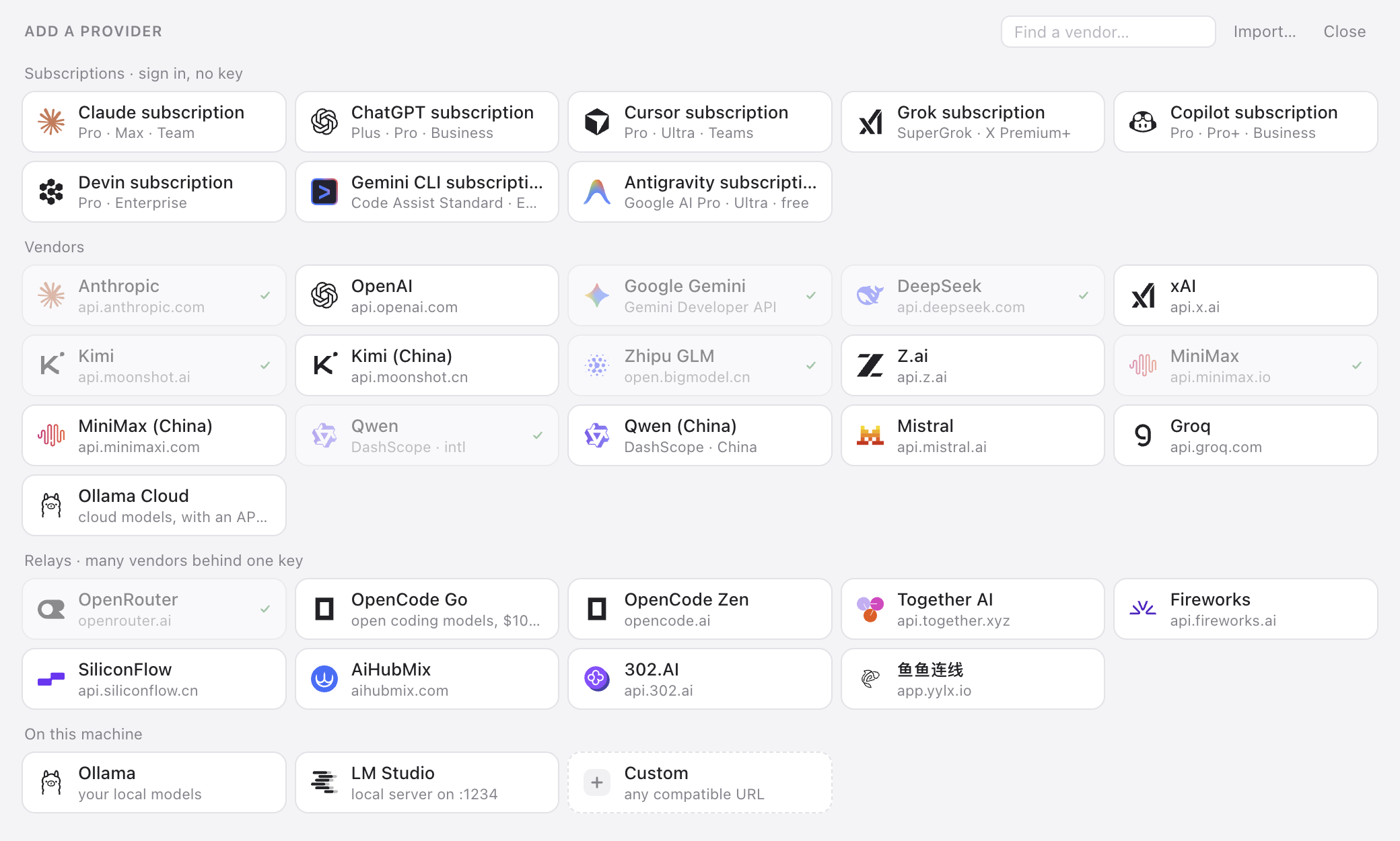
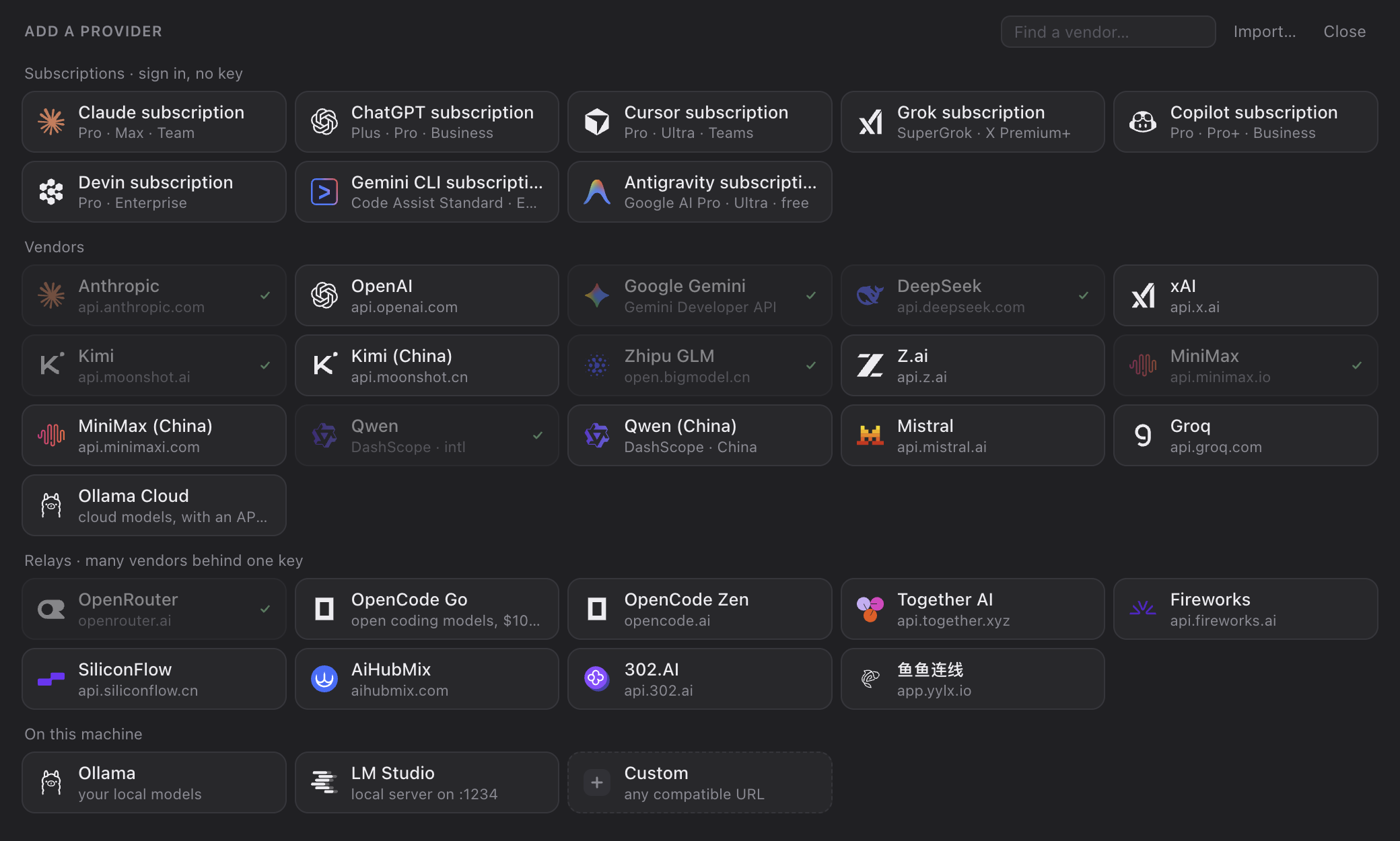
Open the Providers tab and press + Add provider. Pick a tile, or type a vendor’s name to find it.
Subscriptions · sign in, no key
Claude (Pro, Max, Team), ChatGPT (Plus, Pro, Business), Cursor, Grok (SuperGrok), Copilot and Devin. Click the tile and magpie opens the vendor’s own sign-in page in your browser; the account shows up as soon as you finish (Copilot gives you a code to enter on GitHub’s page). Subscriptions are added here, in magpie, not by logging in inside another agent.
- More than one account. Click the Claude or ChatGPT tile again to add another; each is listed under the provider, one click from being the one in use.
- Already signed in? An agent you are signed in to on this machine shows up as a provider too, signed in as ….
- Every agent can use it. A subscription’s models are
claude/…,codex/…,copilot/…in every other agent’s picker. Claude subscription requests run through the Claude Code installed on this machine, so keep it installed.
Vendors
Anthropic, OpenAI, Google Gemini, DeepSeek, Kimi, Zhipu GLM, MiniMax, Qwen, Mistral, Groq, xAI and more. Pick one, paste the key (Get a key ↗ links to the vendor’s key page), save. magpie asks the vendor which models it serves and offers those; open the provider’s row to choose which ones agents see, or Test it.
On this machine
Ollama and LM Studio. No key.
Custom · any compatible URL
For anything else: a Name, an OpenAI compatible base URL (ending in /v1), an Anthropic compatible one (the root, what ANTHROPIC_BASE_URL would take), or both, and the key. Give every API the endpoint speaks; each agent uses the one it speaks natively and magpie translates for the rest.
settings.json and Codex’s config.toml, changes nothing in them, and brings over the providers you tick.Keys live in ~/.config/magpie/providers.json, readable by you alone. magpie never reads keys from your shell environment: what you add is what it uses.
2 · Pick a model for each agent
The Agents tab has a row for each agent installed or configured on this machine. magpie knows Claude Code, Codex, Gemini CLI, OpenCode, MiMo Code, DevEco Code, Pi, Goose, Cursor CLI, Copilot CLI, Crush, DeepSeek Harness, Command Code, omp, OmO, Devin, Hermes Agent, MiniMax Code, Grok Build, ZCode, OpenHanako and Alma.
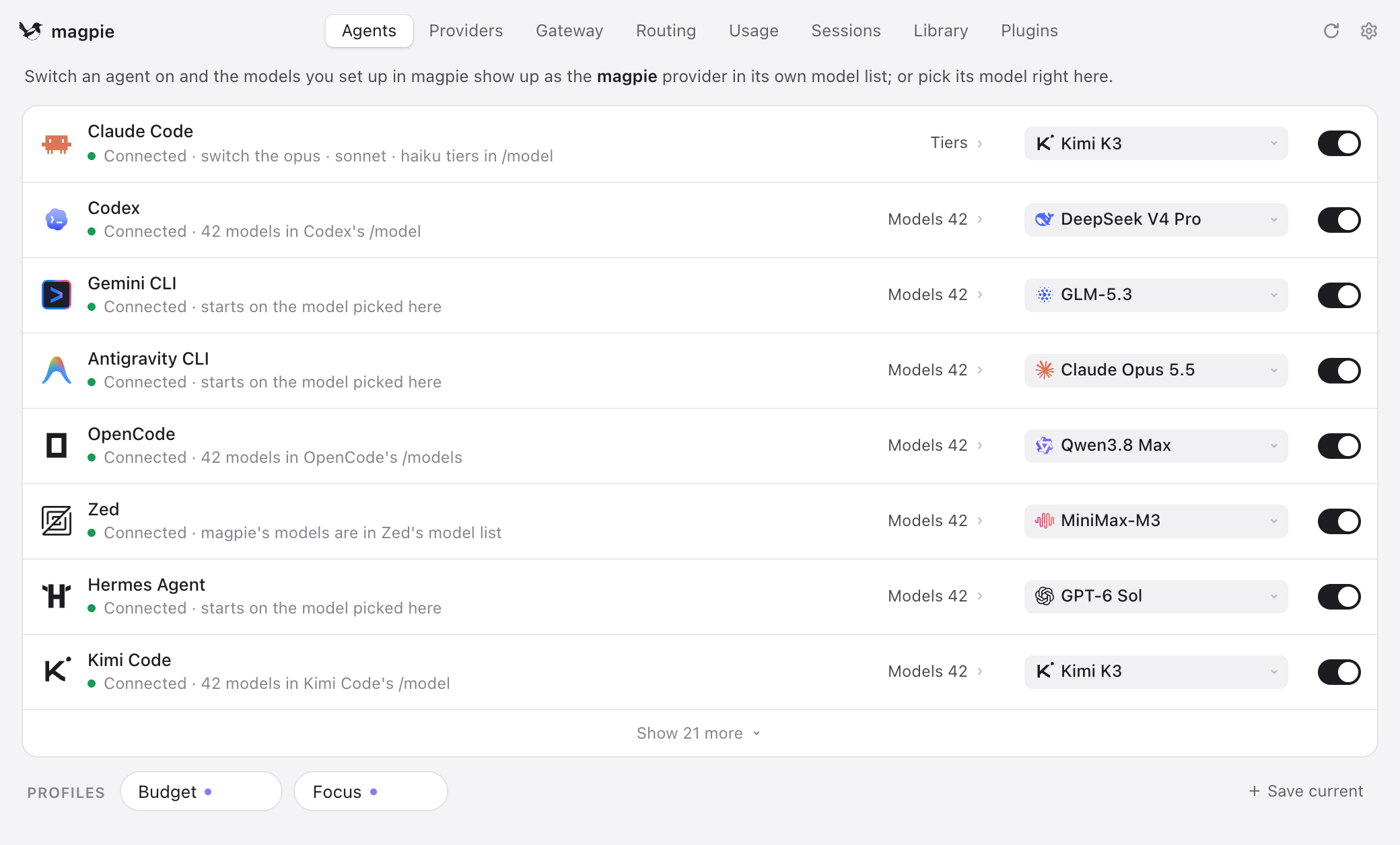
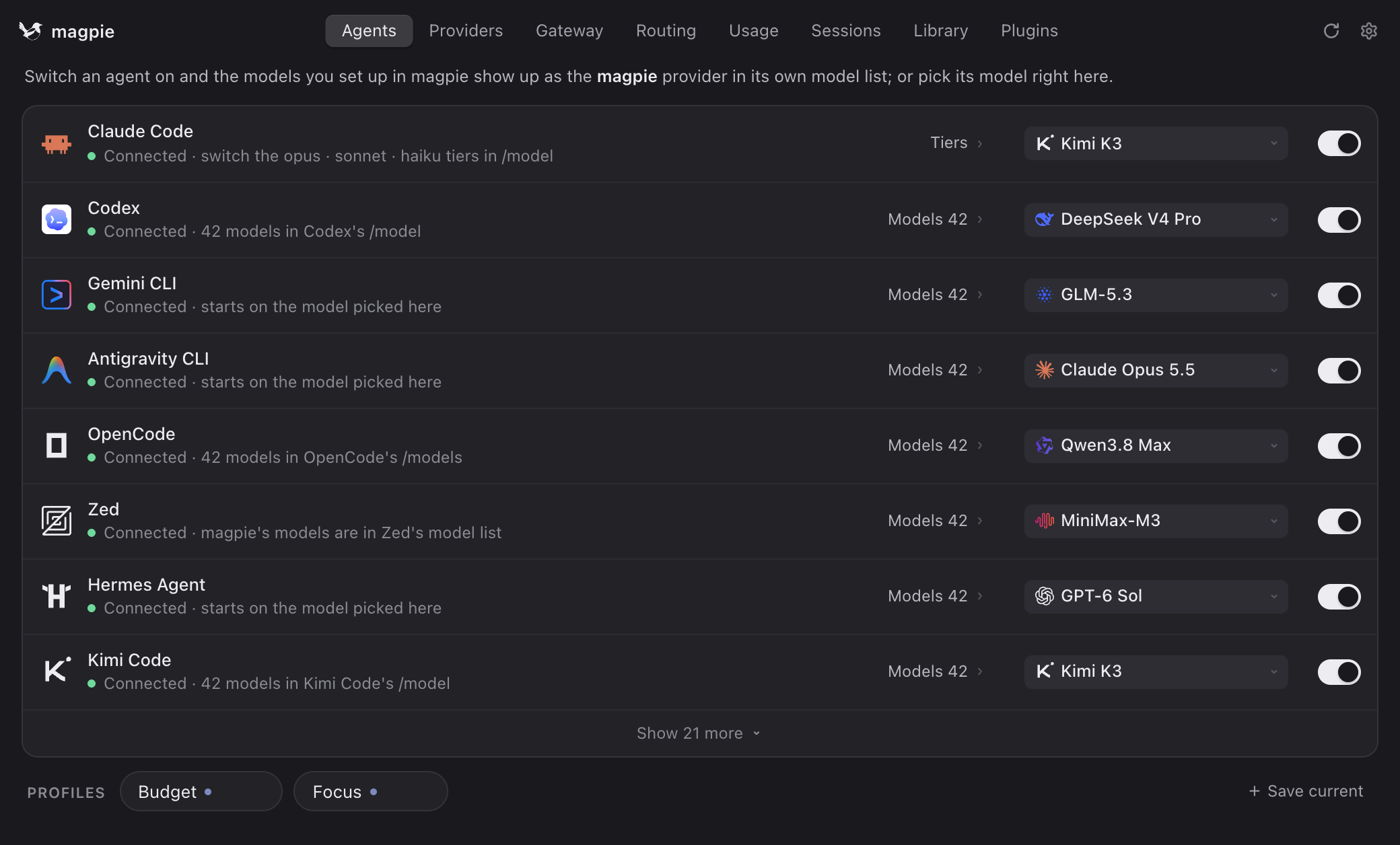
- Click the model to open the picker. Models are grouped: the agent’s own, your routing groups, then each provider you added. Type to filter, or type any model id that is not listed.
- Reasoning effort, where the agent has it (Codex’s effort, Pi’s thinking), is a slider under the list.
- Claude Code through magpie can also give its opus, sonnet and haiku tiers models of their own; by default they follow the main model.
Picking a model writes it into the agent’s own config file. Only the keys magpie needs change; comments, ordering and indentation survive, and writes are atomic.
| Agent | What a model through magpie writes |
|---|---|
| Claude Code | ~/.claude/settings.json: ANTHROPIC_BASE_URL, ANTHROPIC_AUTH_TOKEN and the model variables in its env block |
| Codex | ~/.codex/config.toml: a [model_providers.magpie] table and the model, with the list in magpie-models.json. Your ChatGPT sign-in is left alone |
| OpenCode, MiMo Code, DevEco Code, Pi, Crush | A magpie provider entry, and magpie/provider/model |
| AtomCode | ~/.atomcode/config.toml: a magpie provider account and one model entry per catalog model |
| Snow CLI | ~/.snow/profiles/magpie.json: a magpie profile, made the active one (Snow App takes it in with "Sync Snow CLI API config") |
| Gemini CLI | GOOGLE_GEMINI_BASE_URL pointed at the gateway, API-key auth, and the model |
A running session keeps the model it started with. Agents read their config when they start, so the change applies to the next session. Codex builds its model list at start-up too: restart the Codex app and open codex sessions after a switch.
~/.claude or ~/.codex config. Set the model once in magpie and they get it too, from their next session.3 · Optional: routing groups
With one account per provider you can skip this. It matters once you have several: two ChatGPT accounts, or the same model from a subscription and from a key.
Several accounts or keys in one provider
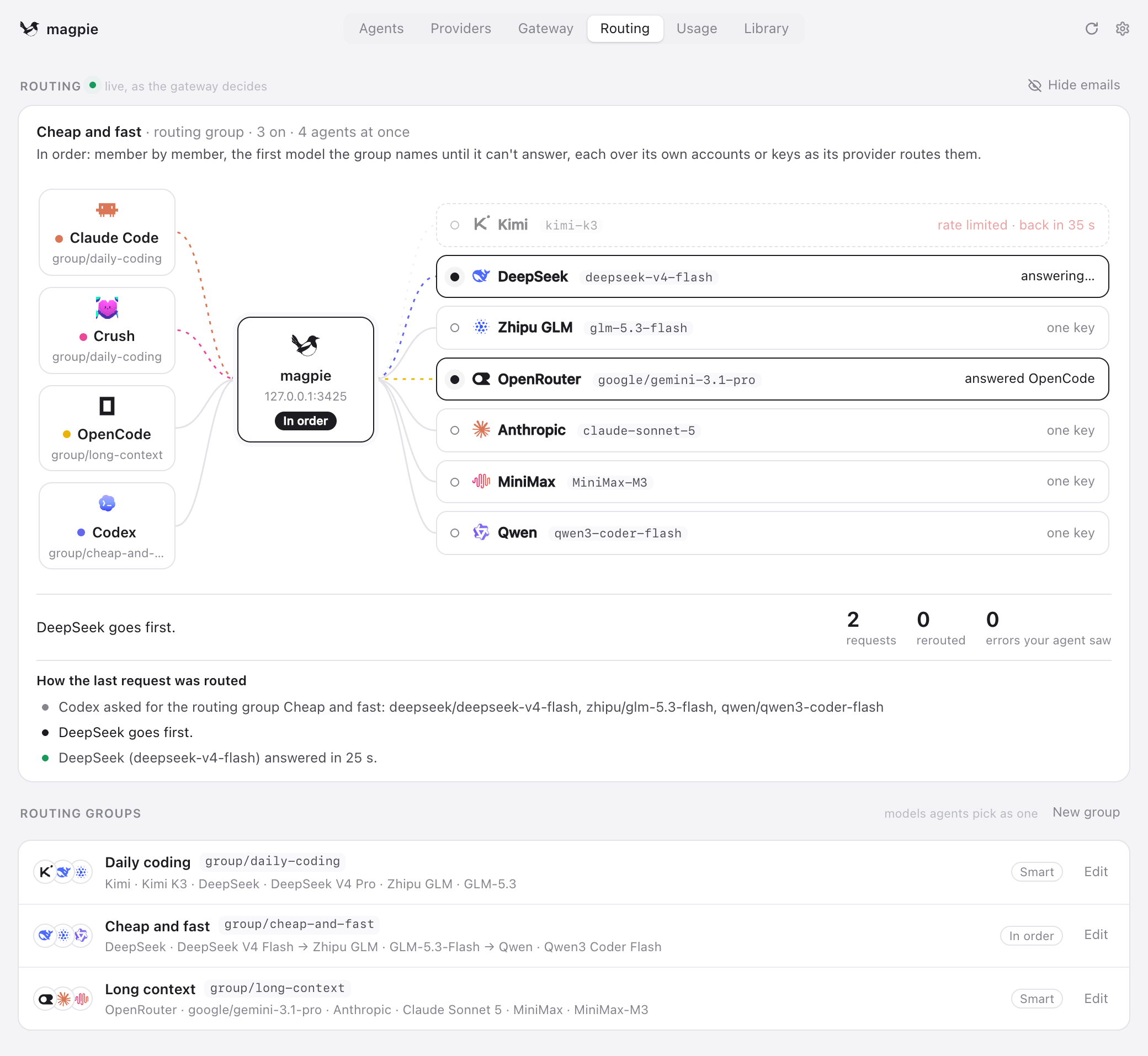
Open the provider’s row and tick every account or key to use. Routing says how requests spread over them: Smart (the default), In order, In turn, Least used first or Weekly pace. Fallback lists models to use instead when the provider is out of quota, rate limited or down.
One model over several providers
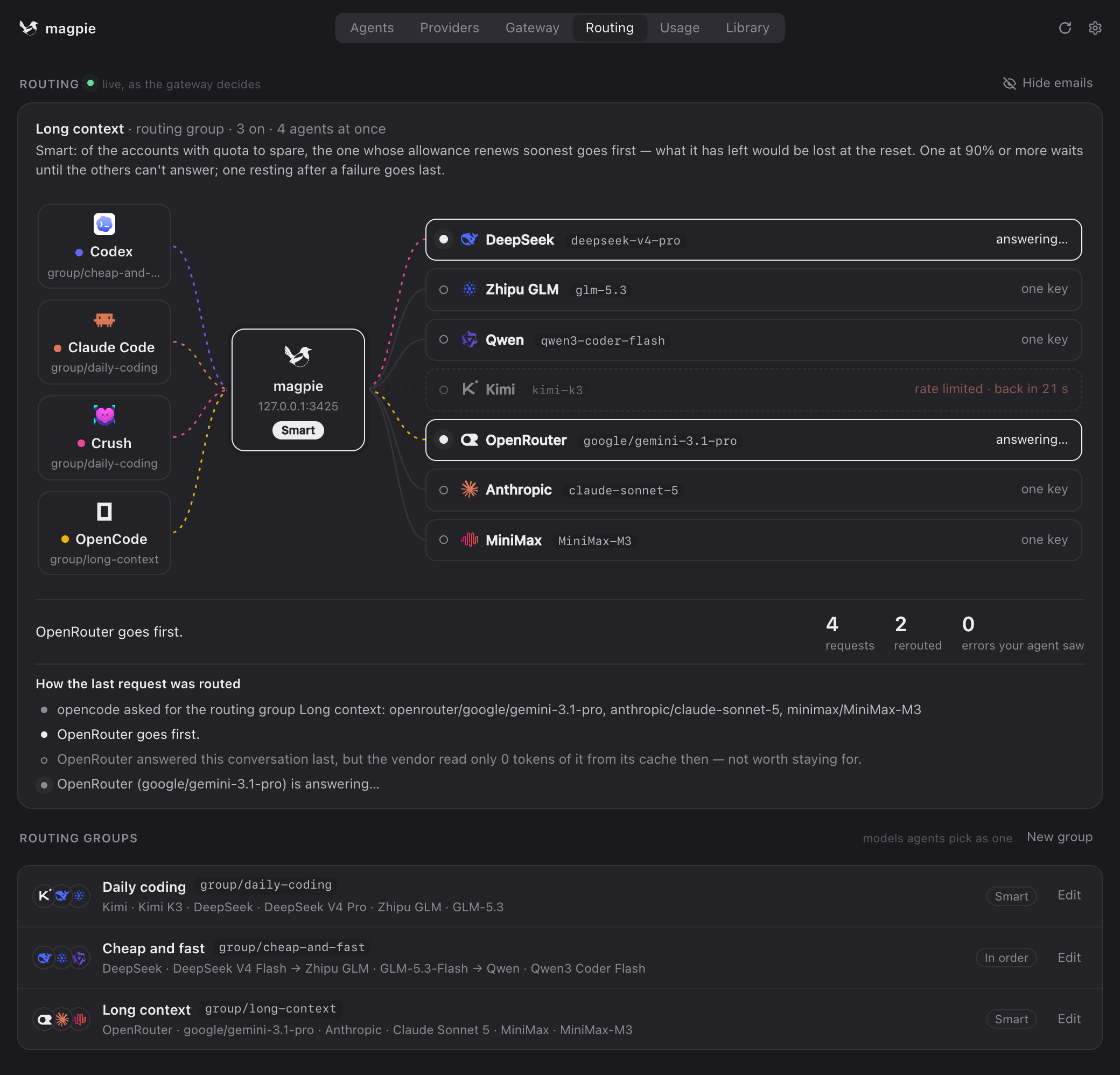
A group is several models, from one provider or many, that an agent picks as one: group/<id>, under Routing groups in the picker. A model two of your providers serve under the same name becomes a group on its own; New group in the Routing tab makes one of any models you like. The first model answers for what the group can do.
auto/<model> (the model's own id, as in auto/claude-opus-4.6; the older group/auto-… id still works), over every provider that serves it. The name is matched however each vendor spells it (deepseek/deepseek-chat, deepseek-chat). Pick it for an agent to spread its requests over all of them; magpie group rm hides one you don’t want.| Routing | What goes first |
|---|---|
Smart smart | The default. Over the members’ accounts and keys together (a group in the group as one, see below): of the subscriptions with quota to spare, the one whose allowance renews soonest. The week decides; an account with five hours and no week (Claude Enterprise) goes by its five hours, so ahead of every week renewing later. Credits with no reset (WorkBuddy’s packages, each ending on its own day) count as renewing when the soonest of those left run out, so the WorkBuddy account whose credits end first goes first. One resting after a failure goes last. |
In order order | The first model until it can’t answer, then the next. |
In turn rotate | Each conversation’s next turn goes to the next member’s account or key, spreading the load. |
Least used usage | The account or key with the most of its allowance left. |
Weekly pace pace | The account with the most of its week left per hour until it renews — the one with the most to lose at its reset — so less of each member’s week is lost at its reset; an account with five hours and no week (Claude Enterprise) by what its five hours have left per hour until they renew, so almost always first. One at 90% or more waits until the others can’t answer. A key by the tokens sent it lately. |
By weight weight | Each model takes its share of the requests by the weight set beside it in the group editor (1 to 1000, 1 if unset): one weighing 3 takes three for every one a model weighing 1 takes, spread out rather than in bursts. Each model is tried whole over its own accounts or keys, as its provider routes them, and a group in the group counts as one. One resting after a failure leaves the round; the next model is the fallback when one fails. |
| Stays | How long a conversation stays with the account or key that answered it |
|---|---|
Auto auto | The default. Within a turn always, across turns while what the vendor cached of it is worth keeping. |
Session session | The whole session, while it can answer. |
Within a turn turn | While the agent sends tool results back; when you speak again, routing decides afresh. |
Off off | Every request is routed afresh. |
Strict strict | Never moves to another account or key, even past its usage cap: when that one is rate limited or out of quota, the error goes to the agent. New conversations are routed as usual. |
Rules · a turn to a chosen model
A group’s Rules send a turn to one of its models when the turn is of a kind you name: long (tokens ≥ N), carrying an image, asking for reasoning (on, or at least a level), from certain agents, asking for something you describe (an intent), the agent compacting its context, or working in one of some folders (a project). A rule’s conditions all have to hold, so one can say “in ~/work/acme, and long”. They are looked at top first when you send a message; the first that matches puts its model first, with the group’s others behind it if it fails. A turn no rule matches is routed as the group always routes, and keeps to where it was.
- A rule decides as a turn begins, and the turn stays on that model while the agent sends tool results back, so what the vendor cached isn’t lost halfway. The one exception: a turn that grows past its model’s context moves to a member that takes it.
- Tokens are estimated from the request’s size, or what the vendor counted for the conversation’s last request, whichever is more. Leave some margin: a rule at 150k for a 200k model, not 199k.
- A subagent is a conversation of its own, so a rule can send it elsewhere while its agent keeps where it is.
- An intent is a few words for what the user asks for — “writing or fixing tests”, “a quick question”. As a turn begins, the group’s classifier — any model magpie has; a small, fast one without reasoning is best — is asked once which of the intents that could match the user’s message is. Only the message is sent, not the conversation. If it fails, exceeds the configured timeout (8 s by default; set in Settings → Models → Replies → Intent classifier timeout) or can’t say, no intent matches and the turn goes by the other rules. It isn’t asked when a rule without an intent would decide anyway, and the same message isn’t asked about twice. Its calls show in Usage as magpie’s own. Exactly what it is asked, how its answer is used and what happens when it fails: Intent routing.
- compacting matches an agent compacting its conversation — Claude Code’s
/compactand auto-compact, Codex, OpenCode, Pi, Gemini CLI, Qwen Code, Kimi Code — so a cheaper, faster model writes the summary while the conversation stays on its own. A compaction is decided on its own: the turn it happens in, and its cache, stay where they were. When the conversation is longer than the rule’s model takes, the next rule that matches, or the group’s order, decides instead. - Hours and days. A rule can hold only at some hours, on some days, by this computer’s clock — a vendor’s peak hours, say. A rule that sends those turns elsewhere still leaves the vendor’s model behind it for failover. To keep a model out entirely, choose Pause the model instead from the rule’s ⋯ menu: while it holds (its hours and days, its agents), that model is left out of the group — never first, never a fallback, not kept for the conversation it was in — and it is back once they end. A pause holds by hours, days and agents only; if every model of the group is paused, the agent is told so.
- Folders. in folder matches a turn from an agent working in one of the folders you list, or a folder inside one:
~/work/acmetakes~/work/acme/web, not~/work/acme-old. The folder is the one the agent tells its model in the request — Claude Code, Codex, OpenCode and Pi say it — so an agent that doesn’t say its folder matches no folder rule.~is your home folder,C:\workis also WSL’s/mnt/c/work, and on macOS and Windows case doesn’t count. - Reasoning. A rule can also set the reasoning its model is asked for, so an intent picks the model and the effort as a pair: Set its reasoning in the rule’s ⋯ menu, or
use-effort=lowfrom a terminal. The model is asked for it whatever the agent asked, at the model’s nearest level; a model whose levels magpie doesn’t know, and the models behind it for failover, are asked as the agent asked. See Intent routing. - The Routing tab says which rule sent each turn where, what the classifier said, and the folder the agent said it was in.
Groups in groups
A group’s models can include another group: pick it under Routing groups in Add a model, or models+=group/<id> from a terminal. The group in it takes its place in the order and routes among its own models by its own routing and rules. So Coder can be deepseek-v4-pro then Fast, and Fast its own order of cheap models. A Coder rule can send a turn to group/fast, and Fast’s own rules then pick which of its models goes first.
- No loops. A group can’t be in itself, directly or through the groups in it. Saving Fast with Coder in it, while Coder has Fast, is refused, and the picker doesn’t offer such a group. Groups go at most 8 deep. A group can’t be removed while another has it: take it out there first.
- Each group routes by its own routing. Whatever the outer group’s routing, it never reaches inside a group in it: Smart, In turn, Least used or Weekly pace weighs the inner group as one member, by the account or key the inner group would try first, and where it lands the inner group is tried whole, in its own order. Coder on Smart with Claude (In order) and GPT (In order) in it compares Claude’s first with GPT’s first, not all of their accounts together.
- So does a provider routed its own way. A model whose provider routes its accounts or keys In order, In turn, by Least used, Weekly pace or Weight keeps that inside any group, weighed as one by the account or key it would try first and tried whole in its own order. One left on Smart, the default, has its accounts weighed with the group’s others as one pool, so the one whose allowance renews soonest goes first whichever provider it is of.
- Failover goes through. If every model in the inner group fails, the outer group’s next member answers, as with any member.
- A model that appears twice (on its own and in a group in it) is asked once, at its first place.
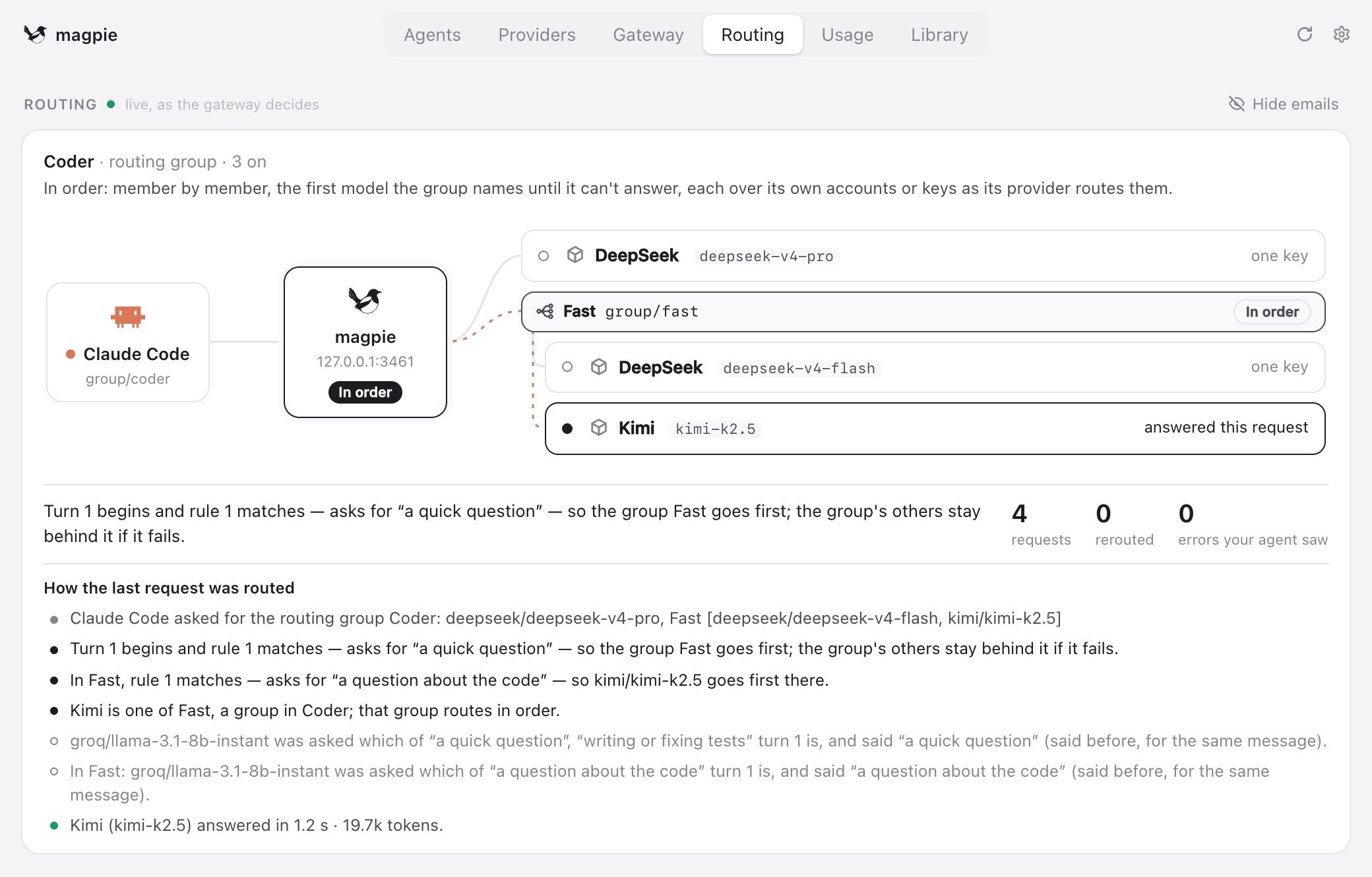
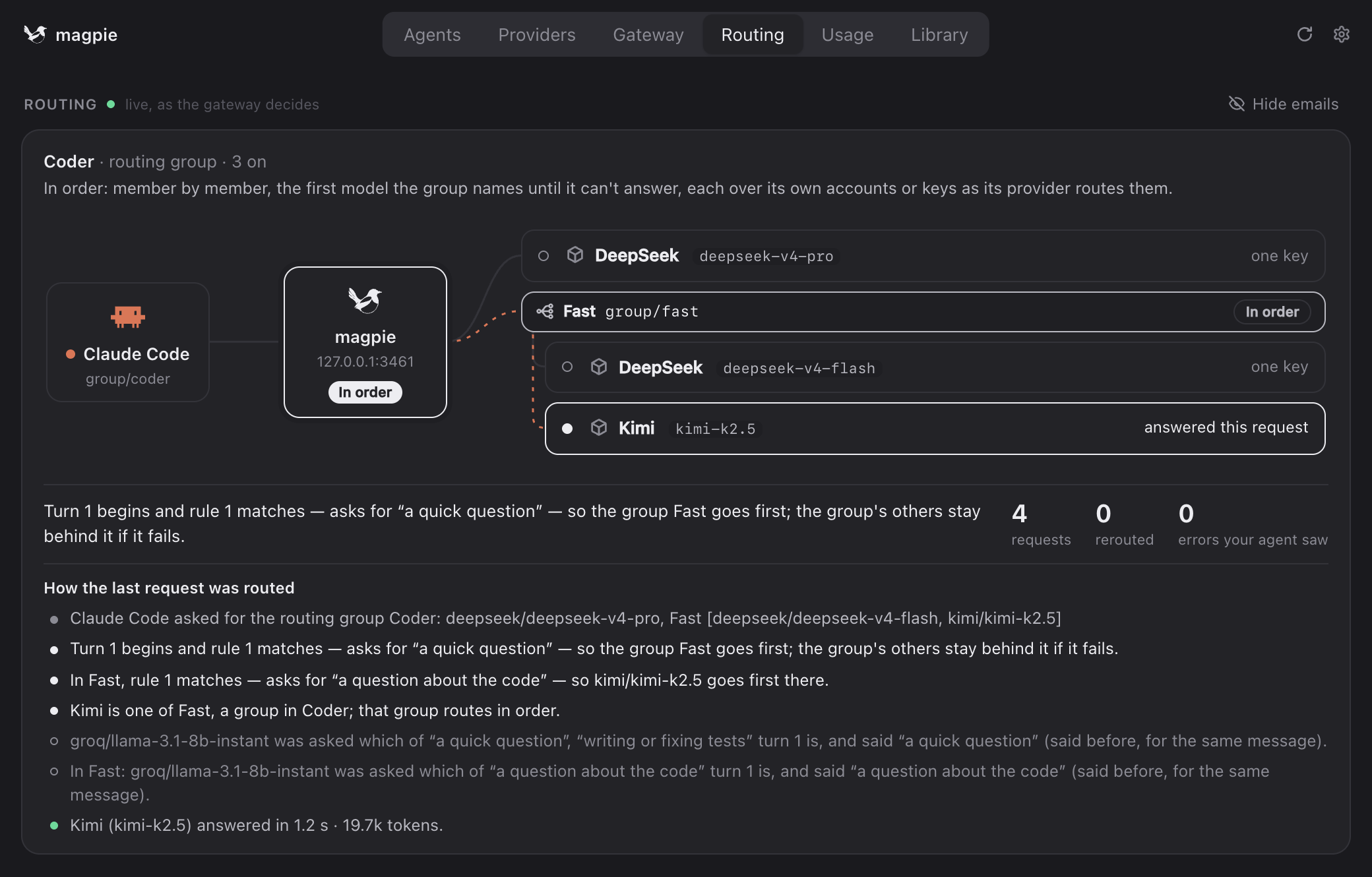
The Routing tab shows the gateway’s decisions live: who answered each request, and why. The same groups from a terminal:
magpie groups                        # yours, then those magpie found
magpie group add "Opus anywhere" models=claude/claude-opus-5-5,copilot/claude-opus-5.5 routing=order stays=session
magpie group set opus-anywhere models+=openrouter/anthropic/claude-opus-5.5
magpie group set opus-anywhere routing=weight weight=claude/claude-opus-5-5=3  # three of every four requests to it
magpie group rule add opus-anywhere use=openrouter/anthropic/claude-opus-5.5 tokens=150k  # long turns to it first
magpie group rule add opus-anywhere use=copilot/claude-opus-5.5 intent="a quick question" classifier=groq/llama-3.1-8b-instant
magpie group rule add opus-anywhere use=deepseek/deepseek-v4-flash compact  # /compact summaries to a cheap model
magpie group rule add opus-anywhere use=kimi/kimi-k2.6 folders=~/oss,"~/My Project"  # turns in those projects to it first
magpie group rule add opus-anywhere pause=copilot/claude-opus-5.5 time=14:00-18:00 days=mon-fri  # left out in those hours
magpie group rule add opus-anywhere pause=claude/claude-opus-5-5 except-folders=~/big-task  # the model kept for the task in ~/big-task: left out of every other folder
magpie group set coder models+=group/opus-anywhere  # a group in a group
magpie group rule opus-anywhere      # its rules; rule rm|mv <n>, rule classifier <group> <model>
magpie group copy opus-anywhere "Opus test"  # the same models, routing and rules, to change on its own
magpie group rm opus-anywhere        # one magpie found is hidden; magpie group restore <id>
magpie claude group/opus-anywhere    # use it
Usage and profiles
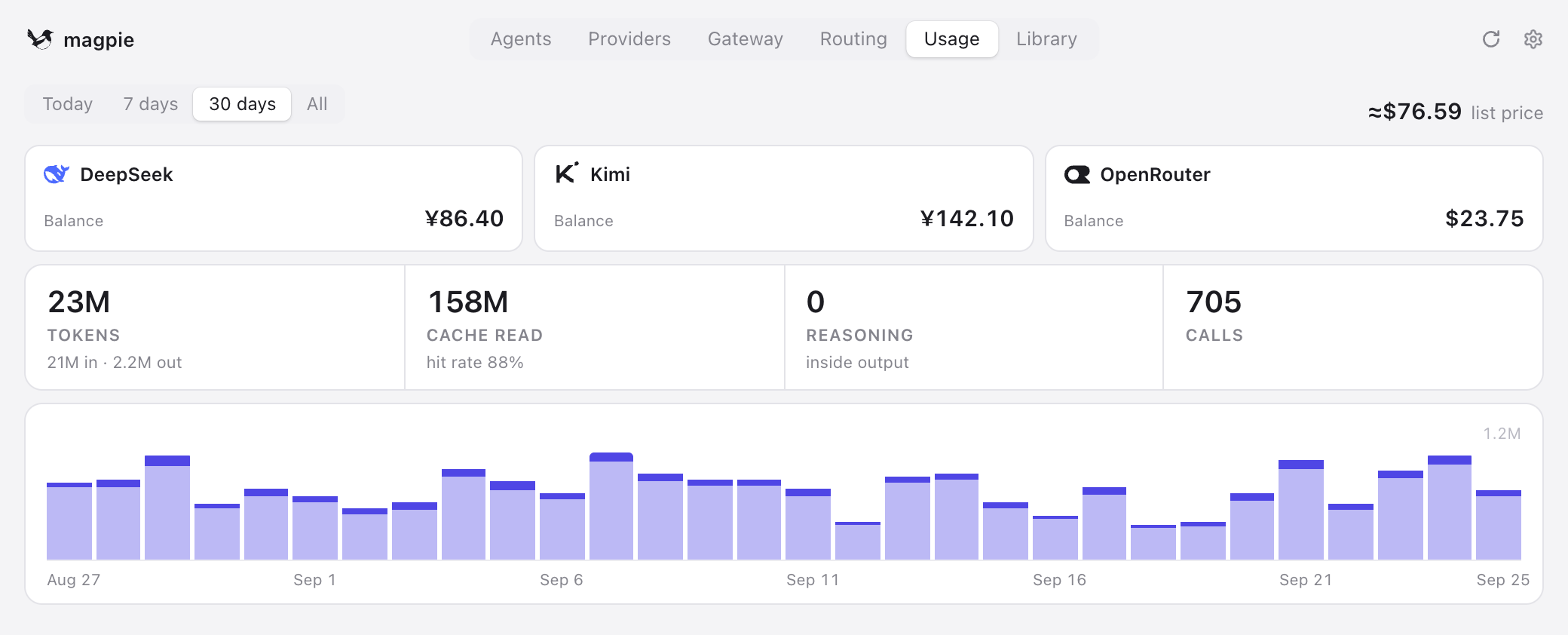
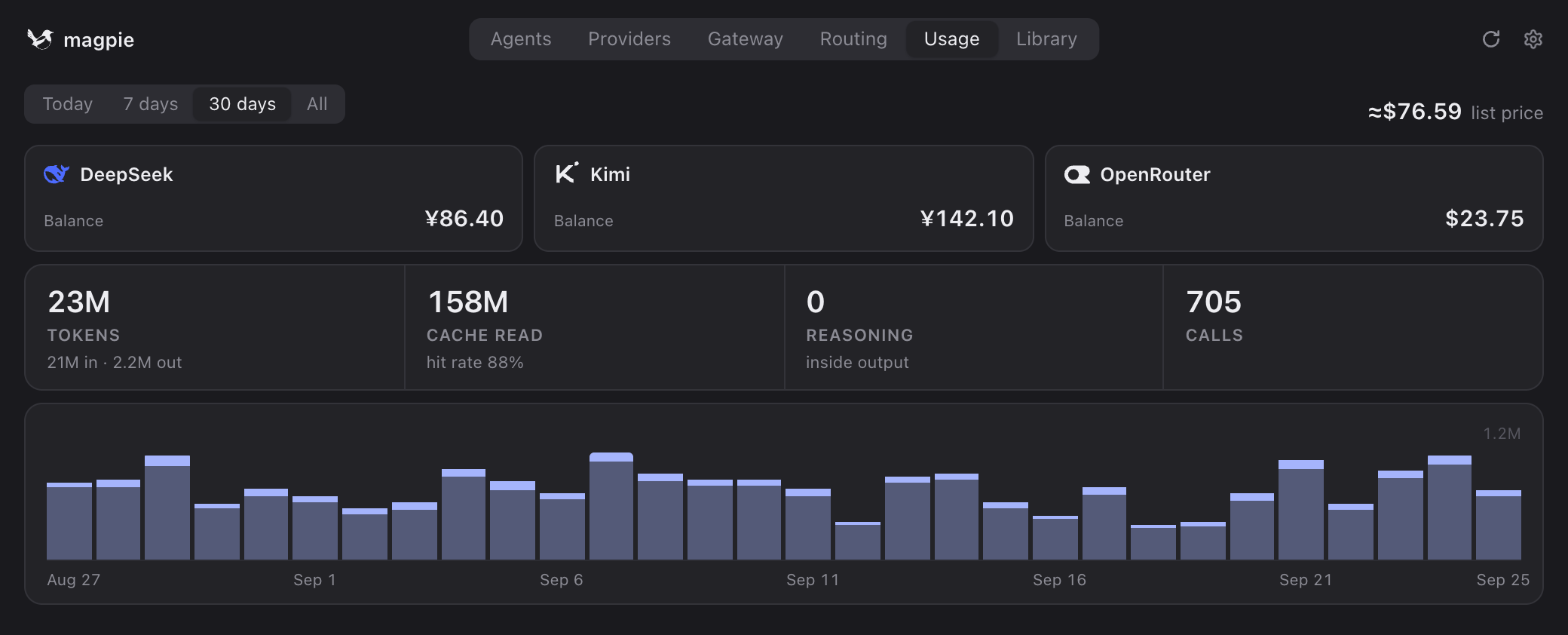
Usage. The Usage tab counts tokens, cache hits and cost for each agent and model, from every call through the gateway, for Today, 7 days, 30 days or All; your subscriptions’ allowance used, and when it resets, sits on top. Calls an agent makes to its own vendor directly don’t pass through magpie and aren’t counted.
Context. Usage’s Context tab shows what each agent’s prompts hold, read as they pass through the gateway: its system prompt, tool definitions (an MCP server’s as one), instruction files and skills, the files its tools read, their other output and the conversation, as parts of the model’s context window. Each agent gets a score out of 100 — how much of its prompt the cache reads, how lean it starts, how fast it fills and how often it fails — and tags such as Lean start or MCP-heavy that say what the score was told by. Open a session to see its latest request’s window, cell by cell; the Routing page shows the same for any request you pick. Click a part, a cell or an item to read its text as magpie sent it, masked where masking is on. That text is kept for the last 10 requests only, in memory while magpie runs; what is saved keeps names only, never your prompt’s text, and nothing of it is sent anywhere.
Profiles. At the bottom of the Agents tab, + Save current snapshots every agent’s settings under a name; click the chip to switch everything back in one move. The profile in use is ticked, and the tray panel’s Profiles button shows its name; a setting changed by hand since clears the tick.
From the terminal
magpie tui is the whole app in a terminal, and every step above has a command. magpie help lists them all.
| Command | Does |
|---|---|
magpie ls | Every agent found and its settings |
magpie presets | The vendors magpie knows |
magpie provider add deepseek sk-… | Add a preset with its key |
magpie accounts add codex | Sign in to one more Claude or ChatGPT subscription |
magpie accounts discovery off | Never read your agents’ sign-ins (Claude Code’s and Codex’s files, the Keychain); on reads them again |
magpie providers | Your providers: host, key, models, who uses them |
magpie models | Every model agents can pick, as provider/model |
magpie claude codex/gpt-5.5 | Set an agent’s model |
magpie codex effort high | Set another field |
magpie codex default | Back to the agent’s own default, magpie’s wiring removed |
magpie save work · use work | Save and apply a profile |
magpie usage 7d | Tokens and cost per agent and model |
magpie tray | Start with the menu bar icon only |
FAQ
Do I need to export OPENAI_BASE_URL or ANTHROPIC_BASE_URL?
No. For the agents magpie lists, it writes the gateway’s address and token into the agent’s own config file. Those variables are only for other tools with a base-URL setting: the Gateway tab’s Connect section has them as copy buttons and snippets.
Does magpie have to be running?
For a model through magpie, yes: the gateway runs with the app. Closing the window leaves it running in the menu bar or tray; magpie tray starts the icon alone (put it in your login items), and magpie serve runs just the gateway, and magpie daemon install keeps it running as a service (systemd on Linux, launchd on the Mac), from login or boot, with no window; magpie daemon install --web has it serve the browser page too, and magpie daemon status prints the page’s link. An agent on its own model and its own sign-in doesn’t go through magpie.
How do I put an agent back the way it was?
Pick one of the agent’s own models in the picker, or run magpie <agent> default. magpie removes what it wrote and restores the values it replaced, such as an ANTHROPIC_BASE_URL you had before.
I switched models, but my agent still uses the old one.
A running session keeps what it started with. Start a new one; for Codex, restart the Codex app too.
Does editing the agent’s config by hand break anything?
No. magpie reads the files each time and touches only the keys it sets, so your other settings and comments stay. Providers brought over with Import… are copies: later changes in the agent’s settings aren’t copied again.
Installing or updating behind a firewall, or without access to GitHub?
Give the installer and magpie update a proxy: curl -fsSL https://magpie-daily-3gj.pages.dev/install.sh | sh -s -- --proxy http://127.0.0.1:7890, or magpie update --proxy socks5://127.0.0.1:1080 (http, https, socks5 and socks5h; HTTPS_PROXY and ALL_PROXY are honoured too). --mirror <prefix> fetches the release file from a GitHub download mirror you choose, as <prefix>https://github.com/…; magpie update mirror <prefix> keeps it for every update, the app’s too, and magpie update mirror off removes it. No mirror is used unless you give one, and the file’s SHA-256 still comes from magpie-daily-3gj.pages.dev, never from the mirror: a file the mirror changed is refused. The app’s own updates go through Settings → Proxy.
What does magpie send about me?
Your prompts, replies, keys and accounts go only to the providers you use; magpie has no server of its own in the path. Once a day a released magpie tells us it is in use, so we know how many people use it and what to look after first: a random id made up on your computer, magpie’s version and your system, and which agents, providers and models it is used with, by magpie’s own ids (claude, deepseek, deepseek/deepseek-v4) with how many of each. A provider you added yourself, and a model on it, is only custom. For each partner listed first in the add sheet, how many times a day it was shown, opened and added from goes with them, as counts only. No names, base URLs, accounts, keys, prompts or usage are sent. Settings → Privacy → Share the agents, providers and models I use leaves out the agents, providers and models, and the partner counts; Count me as a user, DO_NOT_TRACK=1 or MAGPIE_NO_STATS=1 turns it all off. Builds from source never send it. A partner's website and key-page links go through magpie-daily-3gj.pages.dev/go/…, which counts the click (the partner, which link, and a country) before sending you on, and magpie-daily-3gj.pages.dev counts how many times the partner list is fetched. The server sees these whatever the settings say, as any website sees its visits; no id, address or account is kept with them. Icons named by a plugin, an import link or the library are fetched through magpie-daily-3gj.pages.dev/api/icon, so their hosts see Cloudflare's address, not yours; the server only passes the picture on, and counts and keeps nothing. The Privacy page lists everything magpie sends by itself, with an example of the daily count, the files it keeps and every switch.
The agent gets 502 or can’t connect, and nothing shows in magpie’s Routing tab?
A proxy app (Surge, Clash, mihomo and the like, with system proxy, TUN or enhanced mode on) has taken the agent’s request to http://127.0.0.1:3425 and sent it somewhere else, so it never reaches magpie. The bypass list (skip-proxy, “bypass”) isn’t always enough: some agents, Codex among them, send it through the proxy anyway. Add rules that send the local addresses direct, ahead of your other rules:
IP-CIDR,127.0.0.0/8,DIRECT,no-resolve
IP-CIDR6,::1/128,DIRECT,no-resolve
In a Clash or mihomo config the same lines go under rules:, each starting with - . Then send the agent a new request.
Can DeepSeek Harness keep its own DeepSeek row and go through magpie?
Yes, by hand. Connecting dsh adds magpie’s routes and leaves dsh’s DeepSeek row (llm-deepseek) to dsh. That row keeps DeepSeek’s cache when dsh’s prompt or tools change mid-session. To send it through magpie, add this to ~/.dsh/profiles/<profile>/cordis.patch.yml:
- id: llm-deepseek
  config:
    baseURL: http://127.0.0.1:3425
    apiKeyEnv: MAGPIE_DS_KEY
    maxInlineRequestImageBytes: 67108864
    models:
      - id: deepseek/deepseek-flash
        name: DeepSeek V4.1 Flash (magpie)
        contextWindow: 1000000
        inputModalities: [text, image]
        systemPromptUpdate: in-history
        toolUpdate: addition-only
      - id: deepseek/deepseek-v4-pro
        name: DeepSeek V4 Pro (magpie)
        contextWindow: 1000000
baseURL has no /anthropic. The model ids are magpie’s (magpie models), and a models list replaces dsh’s defaults, so keep the two update lines. MAGPIE_DS_KEY holds the gateway key (magpie on this computer), not your DeepSeek key: export it, put it in ~/.dsh/.env, or enter it on the DeepSeek row in dsh’s Models page. Pick the model in dsh; Disconnect leaves the entry alone. magpie has no Files API, so dsh sends images inline as base64 each turn, up to maxInlineRequestImageBytes (20 MiB by default, 64 MiB above). Keep the row on DeepSeek’s own models. More in the reference.
Stuck, or have a setup worth sharing? Ask on Discord. Vendors who want to hand their users a ready-made provider: see Add to magpie.